Showing posts with label desire. Show all posts
Showing posts with label desire. Show all posts
Tuesday, September 17, 2013
New HTC Unveils the Affordable Desire X

Today HTC announced the Desire X, an affordable take on their One series. Just like the One X and One S, the Desire X features HTC’s proprietary ImageChip, Beats audio, and Snapdragon S4 processor. The HTC Desire X will be available in selected markets across EMEA and Asia Pacific from September 2012.


“HTC Desire X is an extension of your social life,” said Jason Mackenzie, President, Global Sales and Marketing for HTC Corporation. “If you’re looking to enjoy and share high quality multimedia, wherever you are, this is the phone for you. It not only looks and sounds great, but also provides a super-fast, highly personal mobile experience at a great price.”
Highlights of the Desire X include:
Highlights of the Desire X include:
- Android 4.0 with HTC Sense
- 4-inch super LCD WVGA screen
- Dual-core 1GHz Qualcomm Snapdragon S4 Play
- 5 megapixel camera with HTC’s proprietary ImageChip, a f/2.0, 28mm wide-angle lens, BSI sensor, HDR mode and automatic adjustable flash
- 768 MB RAM, 4 GB internal storage
- User replaceable 1650 mAh battery
- microSD expansion slot
- Beats Audio

Tuesday, April 30, 2013
HTC Desire Android SIM Unlock how to
Easy ways to do the SIM-Unlock on HTC Desire (Android) there are 2 methods that I know, namely:
1. Boot from CD
2. Boot from USB (PenDrive / FlashDisk) course for the laptop supports booting from USB.
For the first method, the following steps:
1. Download the ISO file below, and burn to CD (this is freeware)
HTC-Desire-unlock_v0.2a.iso
2. Boot the computer with the CD
3. Power up your phone into HBOOT by pressing both Vol-Down and Power buttons
4. Connect the device to the computer and then press ENTER
5. follow the instructions
For the second method, the following steps:
1. Download Multiboot ISO, HERE
2. FlashDisk Plug into your computer, then format
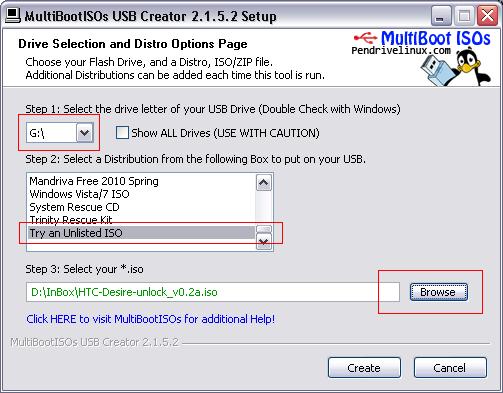
3. Run Multiboot ISO, and adjust the flash drive as the drive in your computer
4. follow the instructions as shown below marked with red boxes mark, then click "create"
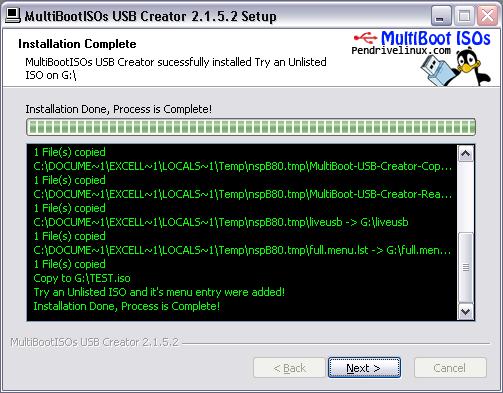
5. after appearing as shown below, click "next"
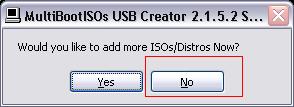
6. last click "no"
After that please boot your computer from USB, and Ulock ready made.
Note: The app does not require root or s-off and Should work on any hboot and radio version. (It has been tested so far with HBOOT up to 0.93.1000 and up-to-RADIO 5.14.05.17).
Its based on Some vulnerabilities and undocumented features, so disclosing Them Would mean the Greater the chance of Them being corrected.
Ive only tested it on Desire GSM and I do not recommend using it on CDMA devices; doing Otherwise Could lead to unpredictable results.
credited to: forum.xda-developers.com
1. Boot from CD
2. Boot from USB (PenDrive / FlashDisk) course for the laptop supports booting from USB.
For the first method, the following steps:
1. Download the ISO file below, and burn to CD (this is freeware)
HTC-Desire-unlock_v0.2a.iso
2. Boot the computer with the CD
3. Power up your phone into HBOOT by pressing both Vol-Down and Power buttons
4. Connect the device to the computer and then press ENTER
5. follow the instructions
For the second method, the following steps:
1. Download Multiboot ISO, HERE
2. FlashDisk Plug into your computer, then format
3. Run Multiboot ISO, and adjust the flash drive as the drive in your computer
4. follow the instructions as shown below marked with red boxes mark, then click "create"
5. after appearing as shown below, click "next"
6. last click "no"
After that please boot your computer from USB, and Ulock ready made.
Note: The app does not require root or s-off and Should work on any hboot and radio version. (It has been tested so far with HBOOT up to 0.93.1000 and up-to-RADIO 5.14.05.17).
Its based on Some vulnerabilities and undocumented features, so disclosing Them Would mean the Greater the chance of Them being corrected.
Ive only tested it on Desire GSM and I do not recommend using it on CDMA devices; doing Otherwise Could lead to unpredictable results.
credited to: forum.xda-developers.com
Subscribe to:
Posts (Atom)